
Comparison
Connecting Cursor & Claude Code to Your Local Laravel Stack on macOS: A Zero-Docker Selection Guide
If you use Cursor, Claude Code, Claude Desktop, or Windsurf on a Laravel project, the slowest part of the loop usually isn't code generation. It's context switching. Three failure modes show up over and over:
- The model invents column names and foreign keys that don't match your migrations.
- You hand-copy stack traces out of
storage/logs/laravel.logor your web server's error log. - You open a second app just to fish a password-reset link out of Mailpit or MailCatcher.
The fix is giving your assistant read access to four local surfaces — database schema + data, Laravel application logs, web server logs, and mail — without Docker, without exposing production, and without pasting .env secrets into a chat window. This guide compares the realistic options on macOS and tells you which to pick.
图示:来源页预览图(仅作编辑上下文;版权归属原发布方) · 来源引用:dev.to
The Four Surfaces You Actually Need
| Surface | Typical macOS location | Why the model needs it |
|---|---|---|
| Database | MySQL/MariaDB via Homebrew socket at /tmp/mysql.sock, or Postgres on localhost:5432 |
Column names, types, indexes, enum values, FK graph |
| App logs | storage/logs/laravel.log (+ laravel-YYYY-MM-DD.log if daily channel) |
Real stack traces, exception classes, line numbers |
| Web server logs | /opt/homebrew/var/log/nginx/error.log, php-fpm logs |
502s, timeouts, rewrite failures the app never sees |
Mailpit (:1025 SMTP / :8025 HTTP) or MailCatcher (:1025 / :1080) |
Verification and reset links for end-to-end flow testing |
Everything below is about getting these four into the model's context on demand — not dumping them into every prompt.
The Options
Option A — Manual copy-paste (the baseline)
You query the DB in TablePlus, copy the CREATE TABLE output, paste the relevant log slice. Works today, zero setup, zero security surface. It also scales terribly: every new question costs you a manual round trip, and the model only ever sees what you remembered to bring.
Verdict: fine as a fallback, never as a workflow.
Option B — Give the agent filesystem + shell access
The cheapest real upgrade. Symlink or point the agent at the log directory, then use ignore rules so it doesn't index the wrong things:
ln -s "$PWD/storage/logs" ./.agent-logs
tail -n 200 storage/logs/laravel.log
Claude Code's Bash tool can run tail, grep, php artisan tinker --execute="...", and curl against your mail catcher directly — no MCP server required. For Cursor, add .cursorignore entries for storage/logs/*.log if you don't want logs indexed but do want them readable on request, and keep .env out of both.
# Mailpit — latest messages as JSON
curl -s localhost:8025/api/v1/messages | head -c 2000

# MailCatcher — same idea, different port and shape
curl -s localhost:1080/messages | head -c 2000
Verdict: highest value per minute of setup. Weak on structured DB access — the model still needs a query path.
Option C — A read-only DB user + a query escape hatch
Whatever tool you use, create a dedicated read-only MySQL user. This is the single most important safety step:
CREATE USER 'ai_ro'@'localhost' IDENTIFIED BY 'a-long-random-string';
GRANT SELECT ON `myapp`.* TO 'ai_ro'@'localhost';
FLUSH PRIVILEGES;
Now any agent that gets a connection string physically cannot DROP, UPDATE, or read another project's schema. Pair it with SHOW CREATE TABLE and information_schema queries for the highest-signal, lowest-token schema context.
Verdict: mandatory regardless of which transport you choose.
Option D — Purpose-built MCP servers
Model Context Protocol servers wrap a database, filesystem, or HTTP API behind typed tools. Cursor reads them from .cursor/mcp.json; Claude Code registers them with claude mcp add <name> -- <command>; Claude Desktop and Windsurf each have their own config file. You get structured list_tables / describe_table / run_select tools plus clean permission prompts.
The catch is that you're assembling and maintaining several servers — one for MySQL, one for the filesystem, and something custom (or curl-in-a-shell) for Mailpit, since mail catchers rarely ship an official MCP server.
Verdict: right answer if you want composability and already run MCP servers for other services. Budget an afternoon for setup and some ongoing drift when server packages change.
Option E — An all-in-one local control plane
Tools like Stratos (disclosure: the original author of the source article built it) bundle DB browsing, log tailing, and Mailpit/MailCatcher inspection behind one MCP endpoint, so a single config entry covers all four surfaces. The trade-off is a dependency that owns your credentials and a smaller ecosystem than the standalone-server route.
Verdict: fastest path to "all four surfaces in one connection," at the cost of a single point of failure.
Criteria Table
| Criterion | Why it decides the outcome | What "good" looks like |
|---|---|---|
| Setup effort | The whole point is removing friction | Under 30 minutes to first useful answer |
| Zero Docker | macOS-native is the constraint here | Homebrew services, native sockets, no compose.yml |
| Client coverage | You probably switch between Cursor and Claude Code | One config that works in ≥3 clients |
| Secret exposure | .env in a prompt is a real incident |
Credentials live in config, never in context |
| Read-only safety | An agent with DROP is a bad day |
Enforced at the DB grant level, not by prompt |
| Live data | Stale schema context causes hallucinated columns | Reads current state on every call |
| Maintenance | Servers break after upgrades | Few moving parts, pinned versions |
Comparison Matrix
| Option | Setup | Client coverage | Read-only safety | Live data | Maintenance |
|---|---|---|---|---|---|
| A. Manual paste | None | All | By hand | Stale | None |
| B. FS + shell access | Minutes | Claude Code, Cursor (partial) | N/A | Yes | Low |
| C. Read-only DB user | Minutes | All (needs a query path) | Enforced | Yes | None |
| D. MCP servers (assembled) | Hours | All MCP clients | Per-server | Yes | Medium–high |
| E. All-in-one control plane | ~30 min | All MCP clients | Per-tool allowlist | Yes | Low |
Recommendation by Scenario
"I just want the logs and mail in context today." Go with B + C. Create the read-only MySQL user, then let Claude Code's shell tool tail logs and curl Mailpit. Add .cursorignore rules for Cursor. You'll be productive in fifteen minutes and you haven't installed anything.
"I switch between Cursor, Claude Code, and Claude Desktop daily." Go with D — one MCP setup per client, but a shared, typed tool surface. Start with a MySQL MCP server and the filesystem server, and handle mail via shell curl until you find a mail MCP server you trust.
"I want one config and no assembly." Go with E, accepting the extra dependency. Verify it stores credentials in a local config file, not in chat history.
"I'm on a team and need this reproducible." Go with D, commit the MCP config (with secrets referenced from environment variables, never inlined), and document the read-only grant in your onboarding README.
"I only need schema accuracy, not runtime data." Skip everything except C. Point the agent at database/migrations/ and schema.sql — for many refactors that's sufficient, and it's zero-risk.
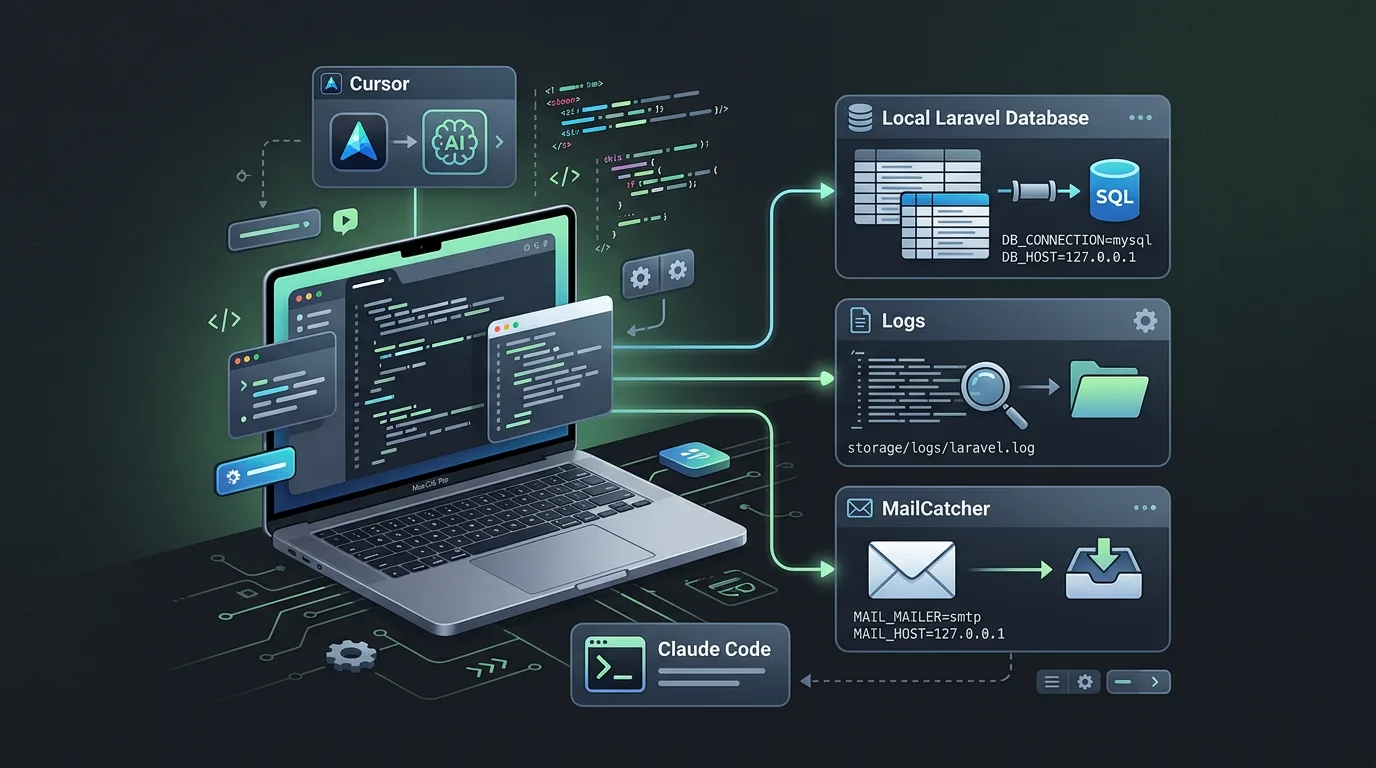
图示:HEXOPS 原创配图(受选题启发,非复制原文图片) · 来源引用:dev.to
Implementation Gotchas on macOS
- Socket paths. Homebrew MySQL/MariaDB default to
/tmp/mysql.sock. If you use DBngin or MAMP, resolve the real path withmysql_config --socketbefore wiring up any connection string — agents will otherwise fall back to TCP and fail confusingly. - Log channel format. Laravel's default single channel writes one huge
laravel.log. Switch todailylocally so agents can target today's file and you avoid feeding 200 MB of history into a context window. - Mailpit vs MailCatcher. They're not interchangeable. Mailpit's API lives at
/api/v1/messagesand/api/v1/message/{ID}; MailCatcher exposes/messagesand/messages/{id}.json. Whichever you run, confirm the HTTP port (8025 vs 1080) before debugging why "the mail tool returns nothing." - Never grant
FILEorPROCESS.GRANT SELECTis enough.FILElets a query read arbitrary files off the host. - Keep
.envout of every index. Add it to.cursorignore,.gitignore, and any agent-specific ignore file. Reference DB credentials from your shell environment or the MCP server's own config. - Prefer
SHOW CREATE TABLEoverSELECT *. It's a fraction of the tokens and carries the constraints the model actually needs to avoid hallucinating foreign keys.
Sources
- Stratos Mac — "How to Connect Cursor & Claude Code to Your Local Laravel Database, Logs & MailCatcher on macOS": https://dev.to/stratos_mac/how-to-connect-cursor-claude-code-to-your-local-laravel-database-logs-mailcatcher-on-macos-4pgb
- Model Context Protocol specification and client configuration docs (Anthropic)
- Laravel documentation — logging channels and
storage/logsconventions - Mailpit and MailCatcher HTTP API documentation